
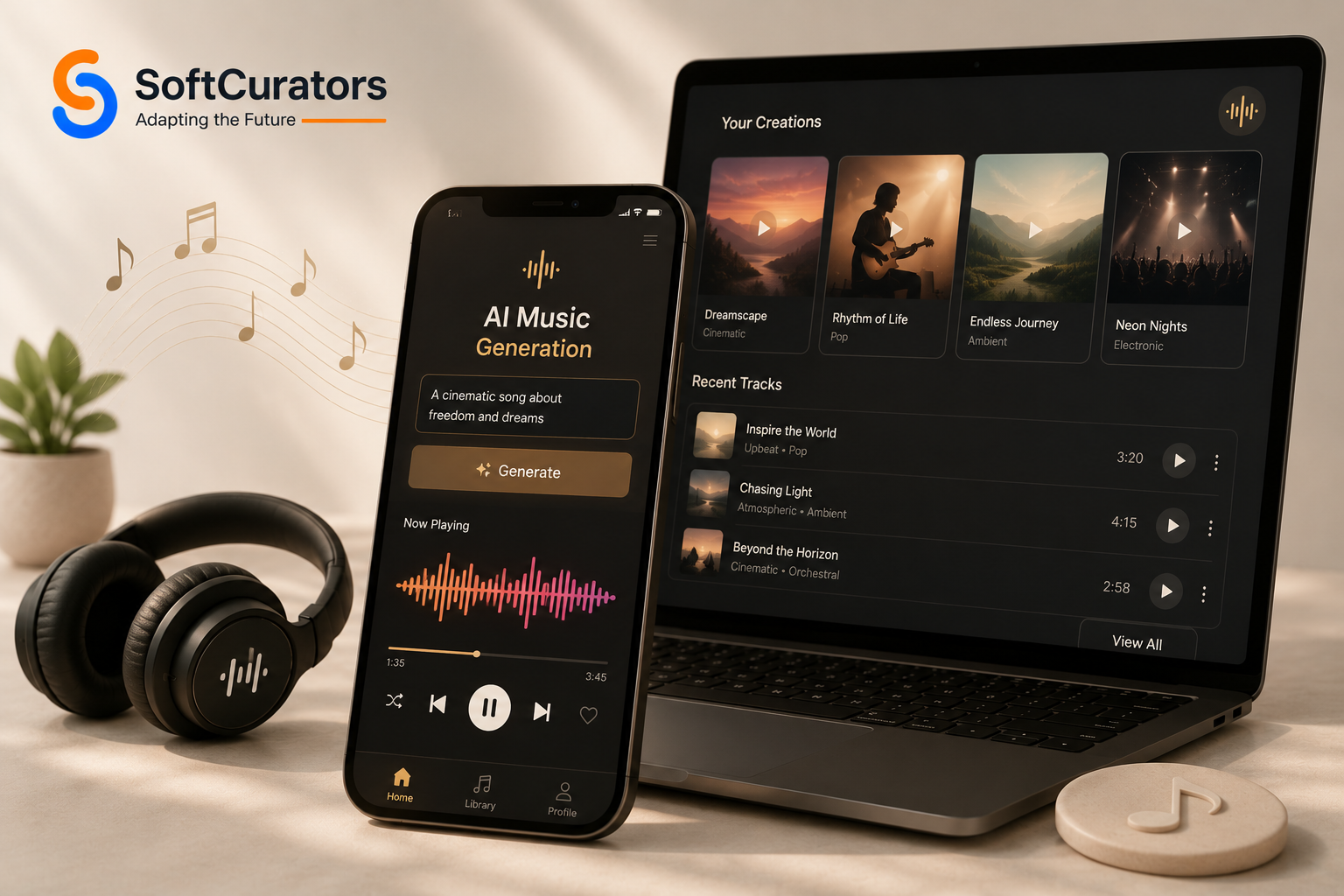
What if your users could type five words and get a full, professional-sounding song back in seconds?
That is exactly what Suno AI does. And it has taken the internet by storm. Within months of launch, Suno AI attracted millions of users who used it to generate songs, jingles, soundtracks, and viral content without any musical training whatsoever.
Now entrepreneurs, music startups, and tech companies are asking the obvious next question: how do I build something like this? This complete guide covers everything you need to know about AI music generation app development from the business model and core features to the technology stack, step-by-step development process, and realistic cost estimates for 2026.
At Softcurators, we are a specialist mobile app and web development company with a dedicated AI development practice. We have helped startups and enterprises build AI-powered products across industries including music streaming apps, content platforms, and AI apps. This guide draws directly from that experience.
Whether you are a first-time founder with a bold vision, or a CTO evaluating build vs. buy this is the most thorough resource you will find on AI music generation app development in 2026. Let us get into it.
Why Build an AI Music Generation App in 2026? The Market Opportunity
Before writing a single line of code, you need to understand why this market exists and why right now is the right time to enter it.
The Numbers Tell the Story
- The global AI in music market was valued at approximately $2.9 billion in 2023 and is projected to exceed $15 billion by 2028 a CAGR of roughly 38%
- Suno AI reportedly reached 10 million users within its first year without any traditional marketing budget
- Over 500 million people globally use music streaming services many are hungry for AI-personalized content
- The creator economy is valued at over $250 billion in 2024, and AI music tools are becoming essential for content creators
- Over 85% of video creators say finding the right background music is a major pain point AI music solves this
Who Is Actually Paying for AI Music?
Understanding your customer is critical before investing in AI music generation app development. The paying customers in this market fall into four clear groups.
- Content creators: YouTubers, TikTok creators, podcasters who need royalty-free background music
- Businesses: Brands running ads, e-commerce stores, and retail chains needing custom audio branding
- Developers: Companies building apps that need background music APIs
- Music enthusiasts: Hobby musicians who want to create full songs without formal training
The Timing Advantage in 2026
The AI music generation market is still early. Most tools that exist today have major gaps poor audio quality, restrictive licensing, no API access, limited genre control, or weak mobile experiences. A well-built competitor that solves even two or three of these gaps can capture significant market share quickly.
This is why AI consulting services teams like Softcurators are seeing a sharp increase in inquiries about AI music generation app development from founders who see a clear product opportunity in the market.
How Does Suno AI Work? Understanding the Tech Before You Build
To build something like Suno AI, you first need to understand what is happening under the hood. You do not need to be an AI researcher to understand this but a foundational understanding will help you make smart product and architecture decisions.
Suno AI’s Core Technical Approach
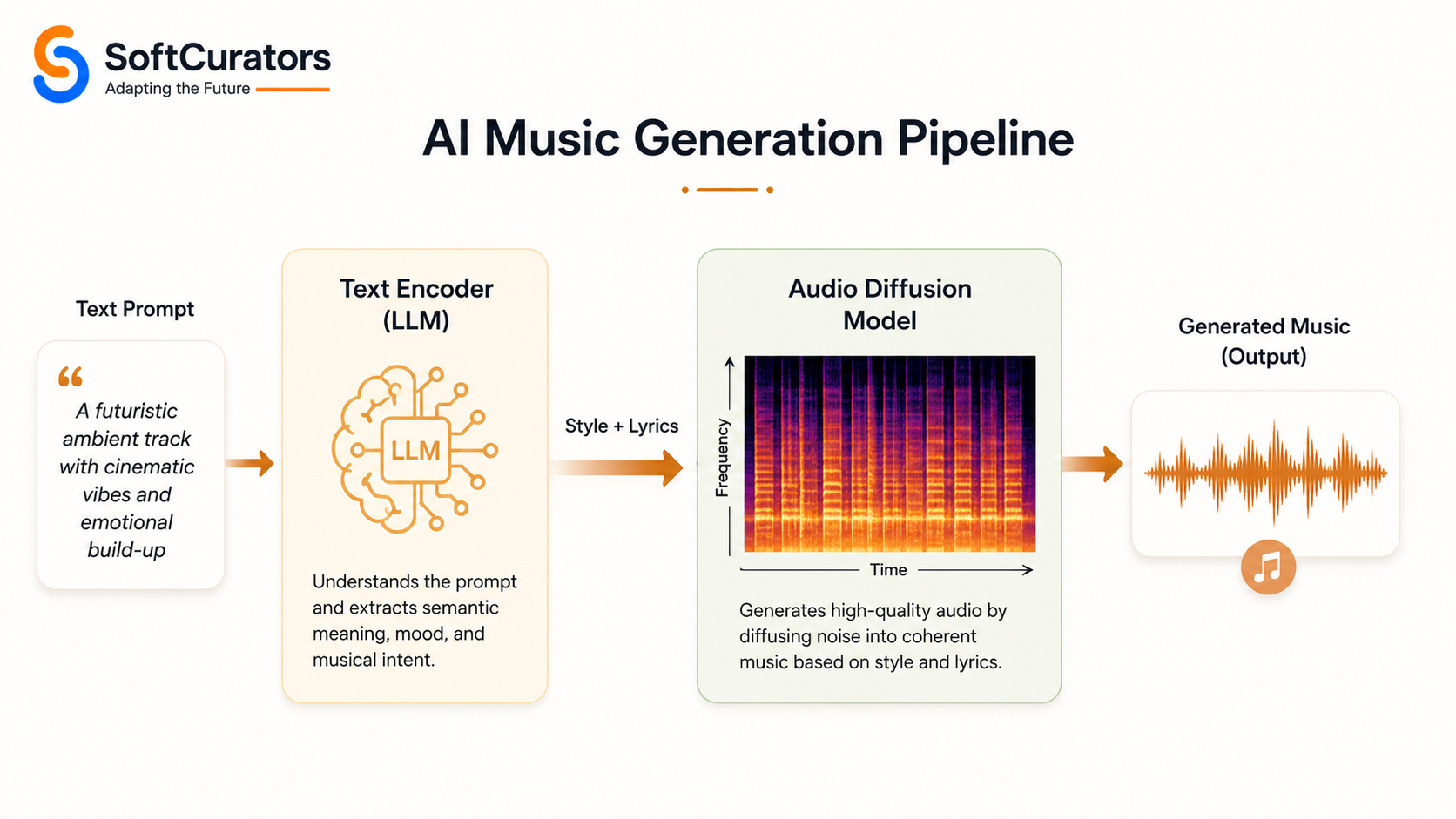
Suno AI uses a combination of large language models (LLMs) and audio diffusion models to generate music. Here is a simplified version of how the pipeline works:
- Text Understanding: The user’s text prompt is processed by a language model that extracts genre, mood, tempo, and stylistic intent
- Lyric Generation: A separate LLM generates song lyrics aligned with the prompt
- Music Generation: An audio model (similar in concept to how Stable Diffusion generates images) generates musical audio aligned with the lyrics and style
- Vocal Synthesis: A text-to-speech or voice synthesis model adds vocal performance to the generated music
- Post-Processing: Audio is cleaned, normalized, and compressed for delivery
The Key AI Models Behind This Category
You do not need to build these models from scratch. Several high-quality open-source and commercial models exist that you can build upon. Understanding which to choose is a major part of AI music generation app development strategy:
- MusicGen (Meta / AudioCraft): Open-source, generates music from text or melody conditioning. Excellent starting point. Available on HuggingFace.
- Stable Audio Open (Stability AI): Latent diffusion model for high-quality stereo audio. Open-source, fine-tunable on custom datasets.
- AudioLM (Google): Generates realistic audio including music and speech. Research model, not fully open.
- Jukebox (OpenAI): Long-form music with vocals. Open-source but compute-heavy. Good for research reference.
- Riffusion: Generates music via spectrogram diffusion. Creative and open-source.
- Custom Fine-Tuned Models: For truly differentiated products, fine-tuning a base model on curated genre-specific datasets delivers the best quality.
Expert Tip: At Softcurators, we recommend starting with MusicGen or Stable Audio Open as your base model and fine-tuning it on a curated dataset for your target genre. This approach balances speed-to-market with output quality.
Business Models for AI Music Generation Apps: How to Make Money
Choosing the right business model is as important as the technology you build on. The wrong monetization strategy can kill an otherwise great product.
Here are the proven revenue models for AI music generation apps, based on what is working in the market in 2026.
| Revenue Model | How It Works | Example Apps |
| Freemium + Subscription | Free limited tier; paid tiers unlock quality & volume | Suno AI, Udio, Boomy |
| Pay-Per-Generation | Users buy credit packs, each song costs credits | Soundraw, Mubert |
| Commercial Licensing Fees | Charge extra for commercial rights to AI tracks | AIVA, Soundraw |
| API Access / B2B | Developers pay for API calls per request | Mubert, MusicGen |
| Revenue Share on Distribution | Platform distributes songs; takes % of royalties | Boomy |
| White-Label / Enterprise | License your platform to businesses | Custom enterprise deals |
| NFT / Digital Ownership | Users mint AI songs as NFTs on blockchain | Emerging niche |
Which Business Model Is Right for Your App?
The right model depends on your target customer. Here is a quick framework:
- B2C Consumer App: Freemium + Subscription is almost always the right starting point. Offer free generation with limits, then convert to a paid plan for higher quality, more tracks, or commercial rights. This mirrors what Suno AI, Udio, and Boomy do successfully.
- B2B / Developer Platform: API access with pay-per-use pricing is the right model. Businesses are comfortable with usage-based billing and it scales naturally with their growth.
- Content Creator Tool: A hybrid of freemium + commercial licensing fees works well. Creators want a free tier to test, but they will pay for commercial rights the moment they monetize their content.
- Enterprise / White-Label: Fixed monthly or annual licensing contracts are preferred by enterprise customers who need predictable costs and custom SLAs.
Softcurators works with clients to model out their revenue scenarios before development begins, through our AI consulting services. This saves significant time and money by aligning the product architecture with the monetization model from day one.
Core Features of an AI Music Generation App Like Suno AI
Features define your product’s competitive position. Get them wrong and users leave within the first session. Get them right and you build a product people talk about.
Here is a comprehensive feature breakdown organized by priority tier.
Tier 1: Must-Have Features (MVP)
These features are non-negotiable for your launch. Without them, users will not see the value in your app.
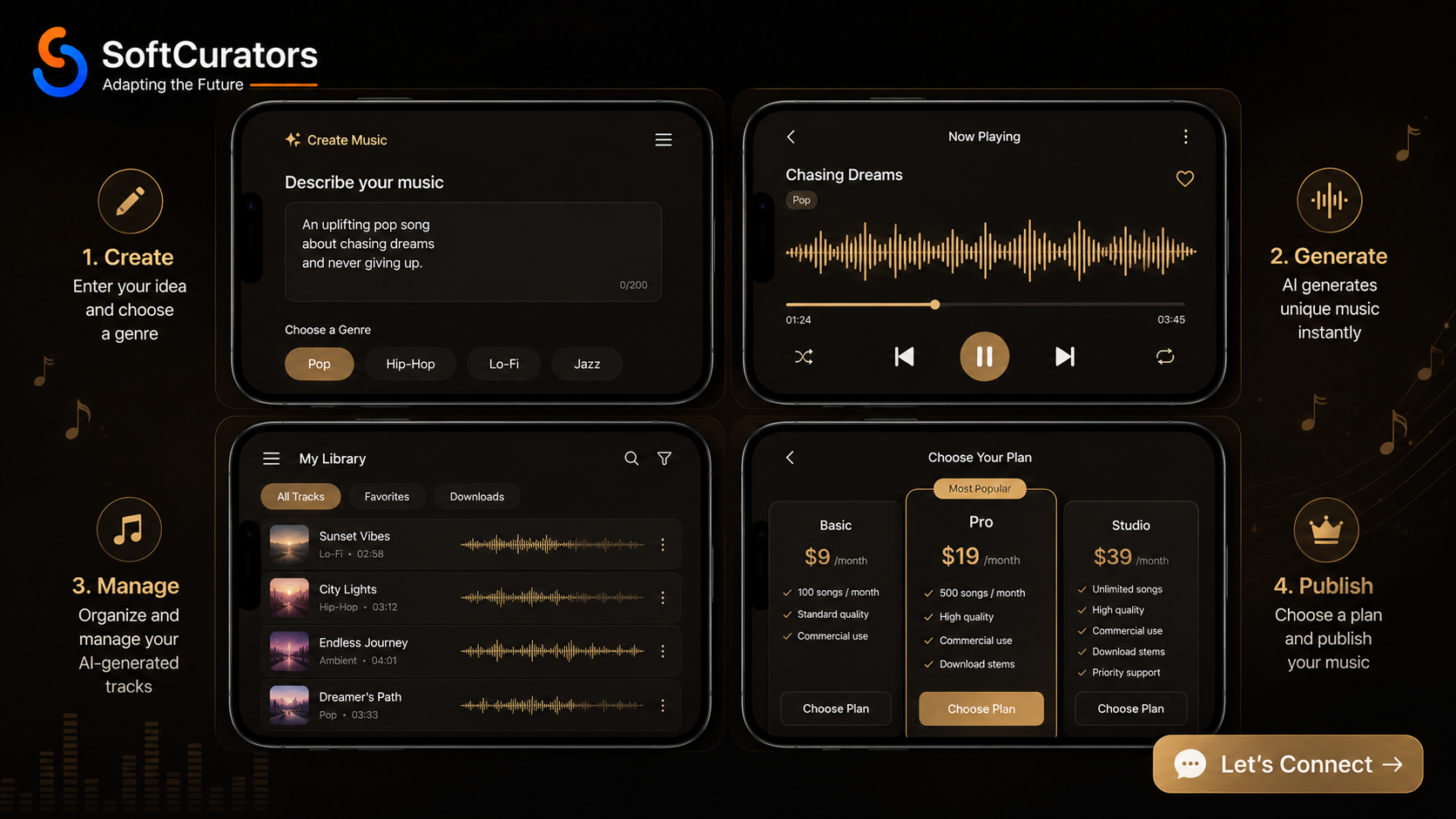
- Text-to-Music Generation: The core engine. Users type a prompt and get music back. Should support genre, mood, tempo, and instrument hints in the prompt
- Style/Genre Selection: Pre-set genre tags (Pop, Hip-Hop, Electronic, Classical, Jazz, Lo-Fi, etc.) that guide the model even for users who are not musically literate
- Real-Time Audio Playback: Low-latency in-app audio player with standard controls (play, pause, seek, volume)
- Track History & Library: Save generated tracks to a personal library. Users need to compare, revisit, and manage their creations
- Download & Export: MP3 and WAV export at minimum. WAV for quality-conscious users, MP3 for sharing
- User Accounts & Authentication: Email/password, Google, and Apple sign-in. Usage limits tied to account tier
- Credit / Subscription System: Clear display of remaining credits or subscription status, with easy upgrade CTA
- Basic Sharing: Share track links externally or to social platforms directly from the app
Tier 2: Growth Features (Post-MVP)
These features drive retention, word-of-mouth, and premium tier conversions.
- Lyrics Generation & Display: AI-generated lyrics shown in sync with the music, like karaoke-style display
- Remix & Variation: Generate multiple variations of a track or remix sections without starting over
- Stems & Instrumental Export: Download separate vocal, bass, melody, and percussion stems for producers
- Custom Duration Control: Allow users to specify track length (15s, 30s, 60s, full song) for different use cases
- Mood-to-Music Generation: Select mood on a slider or visual interface and get matching music without typing
- Track Collaboration: Share edit access with team members or co-creators
- Community Feed: Public or private feed where users can discover and favorite tracks created by the community
- Playlist Creation: Organize generated tracks into playlists for different projects or moods
Tier 3: Advanced Features (Scale)
These features differentiate a mature platform from a basic tool and unlock enterprise revenue streams.
- API Access Portal: Developer dashboard, API key management, usage analytics, and documentation for B2B customers
- Fine-Tune on Your Style: Allow premium users to train a personal style model on their uploaded audio samples
- Melody Conditioning: Hum or upload a melody and have the AI generate a full song around it
- Integrated DAW Features: Basic in-app audio editing trim, fade, tempo adjust, EQ sliders
- Commercial License Management: Dashboard showing which tracks have commercial licenses, with downloadable license certificates
- White-Label Admin Panel: For enterprise customers who want to deploy your platform under their brand
- Royalty Distribution: If you allow tracks to be published to streaming platforms, an integrated royalty tracking and payout system
- Analytics for Creators: Play counts, shares, saves, and revenue earned for each track in the creator’s library
Defining the right feature set for your first release is something the team at Softcurators helps with during our MVP development and prototype development process. We help founders prioritize features that deliver maximum value with minimum scope.
Recommended Technology Stack for AI Music Generation App Development
Choosing the right technology stack is one of the most consequential decisions in AI music generation app development. The wrong choices here create technical debt that is expensive to fix after launch.
| Layer | Technology Options | Purpose |
| AI/ML Model | MusicGen (Meta), Stable Audio, AudioCraft, Custom Transformer | Core music generation engine |
| Backend | Python (FastAPI/Django), Node.js, Go | API server, business logic |
| Cloud | AWS, GCP, Azure (GPU instances) | Model hosting, scaling |
| Database | PostgreSQL, MongoDB, Redis | User data, caching, sessions |
| Audio Processing | FFmpeg, Librosa, PyDub | Audio encoding, waveform analysis |
| Mobile (iOS) | Swift, SwiftUI | Native iOS app |
| Mobile (Android) | Kotlin, Jetpack Compose | Native Android app |
| Cross-Platform | React Native, Flutter | Single codebase apps |
| Web Frontend | React.js, Next.js | Web app / dashboard |
| Audio Streaming | WebRTC, HLS, MPEG-DASH | Low-latency playback |
| Payments | Stripe, Razorpay, PayPal SDK | Subscription billing |
| CDN | Cloudflare, AWS CloudFront | Audio file delivery |
| Analytics | Mixpanel, Amplitude, Firebase | User behaviour tracking |
Why the AI Layer Is the Most Critical Choice
The AI model you choose affects everything downstream audio quality, latency, compute cost, and scalability. Here is how to think about your options:
- Open-Source Models (MusicGen, Stable Audio Open): Best for cost control, customization, and avoiding vendor lock-in. Require your own GPU infrastructure and ML engineering expertise to fine-tune and deploy
- Commercial APIs (Suno API, Mubert API): Fastest to integrate, but you are building on someone else’s platform. Rate limits, pricing changes, and API deprecations are real risks
- Custom-Trained Models: Maximum differentiation and quality for a specific genre or use case, but requires significant ML expertise, a curated training dataset, and 2–4 months of additional development time
Cloud Infrastructure for GPU Workloads
AI music generation is compute-intensive. Standard cloud servers will not work for real-time generation. You need GPU-optimized instances. Here are the best options in 2026:
- AWS: 2xlarge (V100) or g5.xlarge (A10G) best for production workloads with auto-scaling
- Google Cloud: A100 or T4 GPU instances excellent for MusicGen and Stable Audio workloads
- RunPod / Lambda Labs: Cost-effective GPU cloud for startups 30–50% cheaper than AWS/GCP for training jobs
- Replicate: Managed model hosting ideal for early-stage products that do not yet need custom infrastructure
Mobile Platform Recommendation
For most AI music generation app development projects, we recommend starting with React Native app development or Flutter app development for your first version. A single codebase covering both iOS and Android reduces your initial development cost by approximately 35–40% compared to building separate iOS app and Android app codebases.
Once you have validated your product-market fit and revenue model, you can invest in native apps for superior audio performance and platform-specific features.
How to Develop an AI Music Generation App: Step-by-Step Process
Building an AI music generation app is a multi-disciplinary project. It requires AI engineering, backend development, mobile development, audio engineering, and UX design to work in harmony.
Here is the step-by-step process Softcurators follows for AI music app projects.
Step 1: Discovery and Product Strategy (Weeks 1–2)
Every great app starts with a clear problem definition. During discovery, we answer:
- Who is your primary user and what is their specific music need?
- Which competitors are they currently using and why are those unsatisfying?
- What is your differentiating factor audio quality, genre focus, licensing clarity, or integration?
- What does your monetization model look like and how does the feature set support it?
- What is your launch market global, regional, or niche?
Softcurators conducts a structured discovery workshop for every AI music generation app development engagement. This workshop produces a product brief, feature priority matrix, and initial architecture blueprint that guides all subsequent decisions.
Step 2: UI/UX Design and Prototyping (Weeks 3–5)
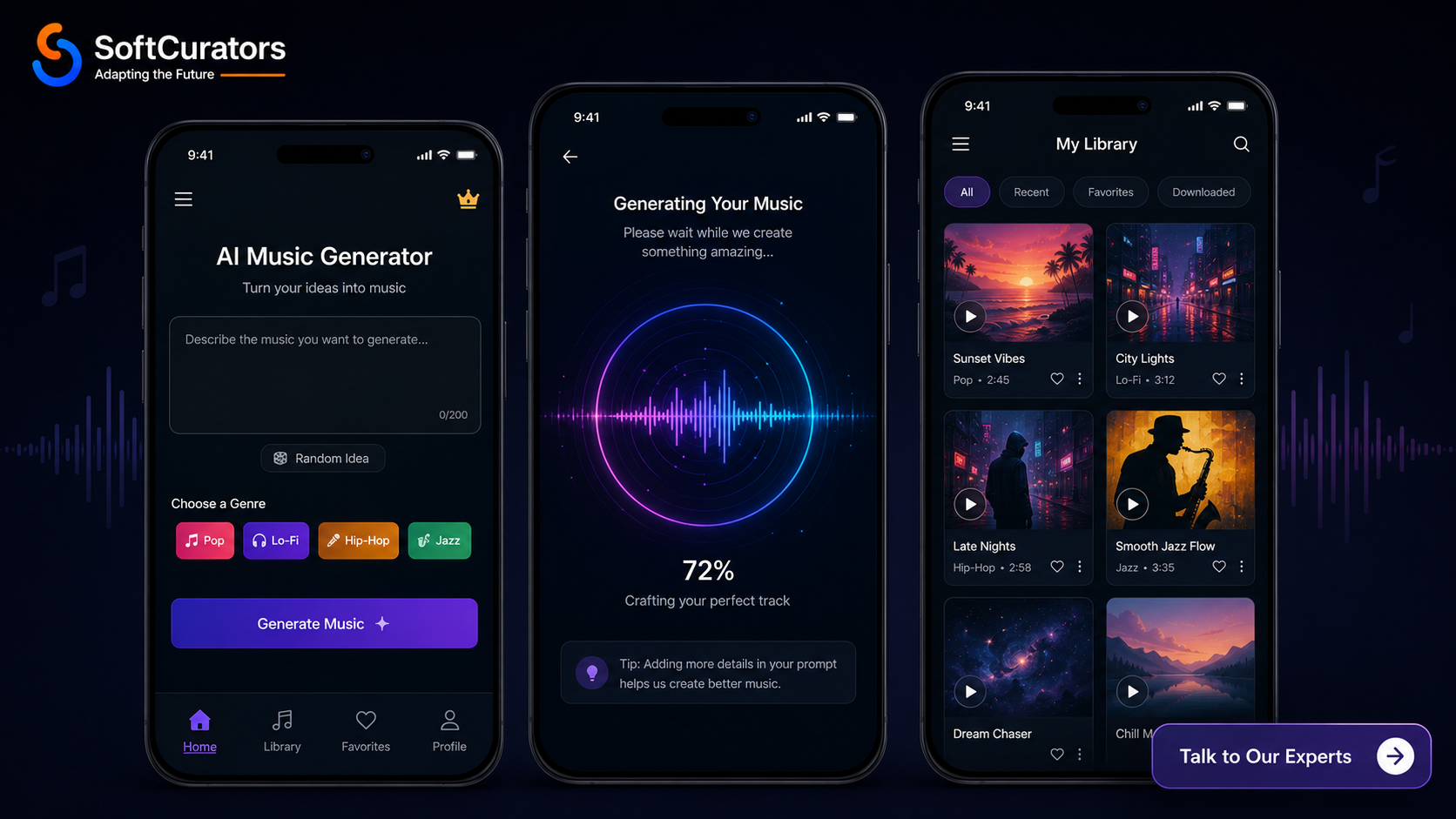
Good design is not optional in a music app. Users judge audio tools by how they feel, not just how they sound. Our UI/UX design team creates:
- Low-fidelity wireframes for every key user flow (generation, playback, library, subscription)
- High-fidelity UI mockups with the visual design system, typography, and colour palette
- Interactive prototypes for user testing before development begins
- Micro-interaction design for the audio player, loading states, and generation progress indicators
Expert Tip: The generation waiting experience is often overlooked but critically important. AI music generation takes 15–60 seconds. Good design fills this time with engaging progress animations, waveform visualizations, or preview snippets that reduce perceived wait time.
Step 3: AI Model Selection and Fine-Tuning (Weeks 3–7, parallel)
While design is in progress, the AI engineering team works in parallel on the model layer:
- Select base model: MusicGen, Stable Audio Open, or a hybrid approach
- Procure or curate a training dataset if fine-tuning is required
- Fine-tune the model on your target genres using GPU cloud infrastructure
- Evaluate output quality using objective metrics (FID, FAD) and subjective human listening tests
- Optimize inference speed reduce generation latency to under 30 seconds for MVP
- Containerize the model using Docker and set up API endpoints via FastAPI
Step 4: Backend Architecture and API Development (Weeks 5–10)
The backend is the nervous system of your AI music app. It handles user management, generation requests, audio storage, payment processing, and API access.
- User authentication service (JWT tokens, OAuth for Google/Apple sign-in)
- Generation queue: manage concurrent AI requests using a task queue (Celery + Redis)
- Audio storage: store generated tracks on AWS S3 or Google Cloud Storage with CDN delivery
- Credit system: track usage against subscription limits or credit balances
- Subscription management: Stripe integration for plan management, billing, and invoices
- Admin panel: manage users, monitor generation jobs, review flagged content, and adjust pricing
Step 5: Mobile App Development (Weeks 7–14)
With the backend and AI layer in place, mobile app development begins. The key components of the mobile app are:
- Onboarding flow: clear value proposition, genre preference selection, account creation
- Prompt input UI: intuitive text input with style tags, genre chips, and mood selectors
- Generation flow: progress animation, estimated time display, preview on partial completion
- Audio player: waveform visualization, playback controls, scrubbing, volume
- Library management: grid or list view of saved tracks with search and filter
- Account and subscription screens: usage stats, plan management, upgrade prompts
- Settings: notification preferences, audio quality settings, linked accounts
Step 6: Audio Engine Integration (Weeks 10–13)
Audio is the product. The in-app audio experience must be excellent native, low-latency, and reliable.
- Integrate platform-native audio APIs (AVAudioEngine on iOS, ExoPlayer on Android)
- Implement HLS streaming for large audio files to reduce loading time
- Add background audio playback so music continues when the app is backgrounded
- Handle audio interruptions gracefully (phone calls, notification sounds, headphone disconnect)
- Implement offline playback for downloaded tracks in premium tier
Step 7: Payment and Subscription Integration (Weeks 12–14)
Monetization must be frictionless. We integrate Stripe for web and use Apple’s StoreKit 2 (iOS) and Google Play Billing (Android) for in-app purchases. Revenue sharing and
- Subscription plan management with upgrade, downgrade, and cancellation flows
- Credit pack purchases with instant balance update
- Commercial license purchase flow with automated license certificate generation
- Webhook handling for payment events (renewals, failed payments, refunds)
- Revenue analytics dashboard for the app owner
Step 8: Quality Assurance and Performance Testing (Weeks 14–16)
QA is not just about finding bugs. For an AI music generation app, it also includes validating AI output quality across edge cases and stress testing the generation queue under concurrent load.
- Functional testing of all user flows across iOS and Android
- AI output quality testing across 50+ prompt variations per genre
- Load testing: simulate 500 concurrent generation requests to validate queue performance
- Audio quality testing: verify output fidelity, file format integrity, and latency
- Payment flow testing: subscription creation, upgrade/downgrade, and cancellation
- Security testing: API authentication, data encryption, content moderation
Step 9: App Store Submission and Launch (Weeks 16–18)
Submitting an AI music app to the App Store and Google Play has specific requirements you need to be prepared for:
- Content moderation policy: both stores require clear policies on AI-generated content
- Copyright disclosure: you must clearly state that music is AI-generated in your app metadata
- Privacy policy and data usage disclosure covering AI training data usage
- Age rating: if your app allows explicit lyrical content, appropriate age ratings are mandatory
- Screenshot and preview video preparation optimized for store conversion
Step 10: Post-Launch: Monitoring and Iteration (Ongoing)
Launch is the beginning, not the end. After launch, Softcurators provides maintenance and support services that include:
- Real-time monitoring of generation success rates, latency, and error rates
- Model performance monitoring: track output quality drift over time
- User feedback analysis: aggregate reviews and in-app feedback to prioritize next features
- A/B testing of prompting interfaces, subscription pricing, and upgrade flows
- Incremental model improvements based on user generation patterns
UI/UX Design Best Practices for AI Music Apps
An AI music app is judged in the first 60 seconds. Either the experience feels magical, or users leave and never return. Here is what separates good music app UX from great music app UX.
Design Principle 1: Make the Prompt Input Effortless
Most users will not know how to write a good AI music prompt. Your design must compensate for this.
- Pre-filled example prompts on first open (‘A relaxing lo-fi track for studying’)
- Tappable genre and mood chips that auto-populate the prompt
- Real-time prompt quality hints (‘Add a mood or instrument for better results’)
- Quick-select presets for common use cases (background music, party playlist, meditation)
Design Principle 2: Make the Wait Feel Like Magic
AI generation takes 15–45 seconds. This is a UX challenge, not just a technical one.
- Animated waveform or music visualization that plays during generation
- Progressive disclosure: show partial results or a 5-second preview while the full track generates
- Estimated time remaining with honest labeling (‘Usually 20–30 seconds’)
- Generation history in background so users can start a new prompt while the first generates
Design Principle 3: The Player Is the Product
Your audio player screen will be the most-visited screen in the app. Invest heavily in it.
- Full-screen waveform visualization that responds to the playing audio
- One-tap download, share, remix, and save-to-library from the player screen
- Lyrics display panel that slides up from the player for songs with vocals
- Related generations panel to discover similar tracks without leaving the player
Softcurators’ UI/UX design team specializes in music-first experiences. We have detailed mobile app UI/UX design best practices built from real music app projects not generic templates.
Legal and Copyright Considerations for AI Music Apps
Legal issues have derailed multiple AI music companies in 2025 and 2026. Suno AI itself has faced lawsuits from major record labels. Before you build, you need to understand the legal landscape.
The Copyright Problem in AI Music
The core legal question in AI music is: does training an AI model on copyrighted music infringe on those copyrights? Courts in the US and EU are still working through this. Here is the current practical guidance:
- Use only licensed or open-source training data datasets like MusicCaps, FMA (Free Music Archive), and your own licensed recordings
- Clearly state in your terms of service that your model was not trained on copyrighted commercial music
- Implement a content moderation layer that detects and blocks outputs that are too similar to known copyrighted songs
- Consider partnering with music rights organizations (e.g., ASCAP, PRS, SOCAN) rather than avoiding them
Commercial Licensing for Generated Outputs
Users need to know what they can do with the music your app creates. Be explicit in your licensing terms:
- Personal use license: free tier users can use generated music for personal, non-commercial purposes only
- Content creator license: paid tier users can use music on monetized platforms like YouTube
- Commercial license: business tier users can use music in paid advertisements, products, and broadcasts
- Full copyright transfer: for enterprise customers, consider transferring full copyright ownership of generated tracks
Important: Do not copy Suno AI’s licensing terms verbatim. Have a music attorney review your license terms before launch. The cost of legal review ($2,000–$5,000) is trivial compared to the cost of a copyright lawsuit.
App Store Content Policies
Both Apple and Google have specific requirements for AI content generation apps:
- You must clearly disclose that the app generates AI content in your store listing
- Implement content filters to prevent generation of music that explicitly reproduces copyrighted material
- Have a clear DMCA takedown policy and a contact email for rights holders to report infringement
- Do not make claims about the commercial usability of generated music without explicit legal basis
How Much Does It Cost to Develop an AI Music Generation App in 2026?
This is the question every founder asks first. The honest answer: it depends significantly on your scope, team location, and model strategy. Here is a comprehensive breakdown.
| Development Component | Basic MVP | Mid-Range | Enterprise |
| AI Music Model Integration | $2,000–$5,000 | $6,000–$15,000 | $25,000–$50,000+ |
| Backend (API, DB, Cloud) | $3,000–$7,000 | $8,000–$18,000 | $28,000–$50,000 |
| iOS App Development | $4,000–$8,000 | $10,000–$20,000 | $30,000–$50,000 |
| Android App Development | $4,000–$8,000 | $10,000–$20,000 | $30,000–$50,000 |
| Web Dashboard/PWA | $1,000–$4,000 | $4,000–$15,000 | $15,000–$50,000 |
| UI/UX Design | $2,000–$4,000 | $4,000–$8,000 | $15,000–$50,000 |
| Admin Panel | $1,000–$3,000 | $3,000–$7,000 | $8,000–$18,000 |
| QA & Testing | $1,000–$2,000 | $4,000–$7,000 | $8,000–$18,000 |
| DevOps / Cloud Setup | $1,000–$3,000 | $3,000–$5,000 | $6,000–$12,000 |
| TOTAL ESTIMATE | $15,000–$40,000 | $30,000–$50,000 | $50,000–$70,000+ |
What Drives Cost Up
- Custom AI model training on proprietary datasets (adds $15,000–$35,000+)
- Multi-platform launch (iOS + Android + Web simultaneously)
- Advanced features like stems export, melody conditioning, or in-app DAW
- Real-time (under 5 second) generation requirement requires more expensive GPU infrastructure
- Enterprise features like API access portal and white-label capability
- Strict compliance requirements (HIPAA for health music apps, GDPR for EU users)
What Keeps Cost Down
- Starting with a cross-platform framework (React Native or Flutter) instead of native iOS + Android
- Using open-source base models (MusicGen, Stable Audio) instead of building from scratch
- Phased MVP approach launch with Tier 1 features only, add Tier 2 after revenue validation
- Managed model hosting (Replicate.com) instead of self-managed GPU infrastructure for MVP stage
- Offshore development team with strong AI engineering capability
Monthly Operating Costs After Launch
Development cost is a one-time investment. But running an AI music app has significant ongoing costs:
- GPU cloud hosting: $2,000–$15,000/month depending on usage volume
- Audio CDN and storage: $500–$3,000/month
- Third-party APIs (payment, analytics, auth): $200–$800/month
- Maintenance and updates: $3,000–$8,000/month (Softcurators retainer)
- Marketing and user acquisition: variable budget at least $5,000/month for early growth
At Softcurators, we provide transparent AI music generation app development pricing with no hidden fees. Contact us at softcurators.com/contact for a detailed quote based on your specific feature requirements.
Development Timeline: How Long Does It Take?
- Basic MVP (Cross-Platform): 8–12 weeks for a functional product with Tier 1 features, one AI model, subscription billing, and iOS + Android apps via React Native or Flutter
- Mid-Range Product (Native + Advanced Features): 12–18 weeks for native iOS and Android apps with Tier 1 + Tier 2 features, multiple AI model options, and a web dashboard
- Enterprise Platform: 20–25 weeks for a full-featured platform with API access, white-label, custom AI model training, and enterprise admin capabilities
Expert Tip: The biggest time variable is AI model fine-tuning. If you start with a public API (Replicate, Hugging Face) and skip fine-tuning for the MVP, you can launch 6–8 weeks faster. Fine-tuning can then be done as a V1.5 update after you have validated the core product.
Why Choose Softcurators for Your AI Music App Development?
Softcurators (softcurators.com) is not a generalist development agency. We specialize in two intersecting capabilities that make us uniquely positioned for AI music generation app development: deep AI engineering expertise and a track record of building production-grade music and content apps.
Our AI Capabilities
The AI development team works with the full stack of modern AI tools from fine-tuning open-source models to deploying inference APIs at scale. Our AI app development practice has delivered AI products across multiple verticals.
- AI automation services automated content pipelines, generation workflows, and API orchestration
- AI avatar development voice and character synthesis that complements music generation features
- AI consulting services architecture reviews, model selection, and AI product strategy
- CurateAI our proprietary AI platform, evidence of our in-house AI development capability
Our Music and Content App Experience
We have built production music streaming apps, content platforms, and social media apps. We know the nuances of audio engineering, streaming infrastructure, and music-first UX design that general-purpose developers often miss.
Common Challenges in AI Music App Development (And How to Solve Them)
Building an AI music app is not straightforward. Here are the most common challenges our clients encounter and how Softcurators helps them overcome each one.
Challenge 1: Audio Quality Is Not Good Enough
The most common complaint in early-stage AI music apps is that the output sounds robotic, repetitive, or low-fidelity.
- Solution: Fine-tune your base model on a high-quality, curated dataset specific to your target genre. Quality of training data is more important than the size of it. Start with 50–100 hours of professionally recorded audio in your target style.
Challenge 2: Generation Is Too Slow
AI music generation that takes 3+ minutes kills the user experience. Users will abandon the session before the track is done.
- Solution: Use quantized model versions, GPU batching, and model caching to reduce inference time. Target under 30 seconds for MVP and under 15 seconds for mature product. Replicate.com and Together.ai offer optimized inference endpoints that help significantly.
Challenge 3: Scaling Under Concurrent Load
What works for 10 concurrent users often breaks at 1,000. AI generation jobs are compute-intensive and queue up quickly.
- Solution: Implement an async job queue (Celery + Redis) with auto-scaling GPU workers. Set honest user expectations with queue position indicators. Prioritize paid tier users in the queue to reduce churn.
Challenge 4: Content Moderation
Users will attempt to generate music with explicit lyrics, offensive content, or content that mimics real artists too closely.
- Solution: Layer multiple content filters: a prompt filter that blocks explicit requests before generation, an output filter that evaluates generated lyrics against community guidelines, and a human review queue for flagged content.
Challenge 5: App Store Approval
AI content generation apps face heightened scrutiny from Apple and Google reviewers.
- Solution: Be proactive in your store submission. Include a detailed reviewer note explaining your content moderation approach. Have your privacy policy and terms of service reviewed by a technology attorney before submission.
Challenge 6: User Retention After Initial Novelty Fades
Many AI apps see great initial engagement followed by a sharp drop-off once the novelty wears off.
- Solution: Build habit-forming features daily generation challenges, community feed, playlist tools, and integration with projects users are already working on. The apps with the strongest retention make AI music a part of users’ existing workflows, not just a standalone toy.
Your AI Music App Roadmap: From MVP to Scale
Building a successful AI music app is a journey in phases. Here is the roadmap Softcurators recommends.
Phase 1: MVP (Months 1–2)
Goal: Validate that users find value in your specific music generation approach.
- Launch on one platform (iOS or web) with Tier 1 features only
- Use a managed AI model API (Replicate or HuggingFace) to minimize infrastructure cost
- Basic freemium model: 10 free generations per month, $9.99/month for unlimited
- Gather user feedback aggressively: in-app ratings, email surveys, user interviews
- Track: day-7 retention rate, generation completion rate, free-to-paid conversion rate
Phase 2: Growth (Months 2–6)
Goal: Convert initial users into paying customers and start meaningful revenue growth.
- Launch on the second platform (Android if you started on iOS, or vice versa)
- Add Tier 2 features based on the most-requested items from Phase 1 user feedback
- Implement fine-tuned custom model to improve output quality (key retention driver)
- Build community features: public track feed, sharing, and remixing
- Explore B2B API access as a secondary revenue stream
Phase 3: Scale (Months 6–12)
Goal: Reach sustainable unit economics and prepare for Series A or profitability.
- Launch Tier 3 advanced features: stems export, melody conditioning, creator analytics
- Open B2B API platform with developer documentation and self-serve onboarding
- Explore partnerships with content platforms (YouTube, TikTok, Canva) for distribution
- Consider licensing your model to white-label enterprise customers
- Evaluate regulatory landscape for compliance as you enter new markets
Softcurators has a structured startup app development programme that takes founders from idea to Series-A-ready product. We have built this muscle across multiple categories and bring it fully to AI music generation app development projects.
Conclusion: Your AI Music Generation App Starts Here
The AI music generation market is real, growing fast, and still early enough for a well-built product to capture significant market share. Suno AI has proved the concept. Now it is your turn to build something better more specialized, better licensed, better designed, or better integrated.
The path is clear. Start with a focused MVP. Choose the right AI model. Build for a specific user. Get the monetization model right from day one. And partner with a development team that has done this before.
Softcurators is that partner. We combine deep AI development expertise with proven mobile app development and music streaming app experience. We have helped founders across industries go from idea to live product and we are ready to do the same for your AI music generation app.
The best time to build this was two years ago. The second-best time is now.
Frequently Asked Questions: AI Music Generation App Development
How long does it take to develop an AI music app?
A functional MVP with cross-platform (React Native or Flutter) delivery takes 8–10 weeks. A mid-range product with native iOS and Android apps takes 12–18 weeks. An enterprise platform with API access and custom AI models takes 20–25 weeks. These timelines assume a fully dedicated team and no major scope changes.
Do I need to build my own AI model or can I use an existing one?
For an MVP, you should use an existing model. MusicGen by Meta or Stable Audio Open are both excellent starting points they are open-source, free to use, and produce good-quality output. For a differentiated product in a specific genre or niche, fine-tuning an existing model on a curated dataset adds significant quality improvement for a fraction of the cost of building from scratch.
What is the best technology stack for an AI music generation app?
For the AI layer: MusicGen or Stable Audio Open on GPU cloud (AWS or GCP). For the backend: Python with FastAPI, PostgreSQL, Redis, and AWS S3. For mobile: React Native or Flutter for MVP, native Swift/Kotlin for scale. For payments: Stripe for web, StoreKit/Google Play Billing for in-app. For CDN: Cloudflare or AWS CloudFront for audio delivery.
How do I avoid copyright issues with AI-generated music?
Use only licensed or open-source training data. Implement content filters to prevent outputs that closely mimic copyrighted songs. Have clear licensing terms for your users differentiating personal, commercial, and full copyright use. Consult a music attorney before launch. Consider partnering with music rights organizations proactively.
Can Softcurators build a complete AI music app end-to-end?
Yes. Softcurators handles the full development lifecycle AI model selection and fine-tuning, backend API, mobile apps (iOS, Android, Flutter, React Native), web dashboard, UI/UX design, QA, App Store submission, and post-launch support. We are a one-stop partner for AI music generation app development. Visit softcurators.com/contact to start the conversation.
What monetization model works best for an AI music app?
For B2C consumer apps, freemium plus subscription is the most proven model it minimizes signup friction while converting power users to paid plans. For B2B, API access with usage-based pricing scales naturally. For content creators, commercial licensing fees on top of a base subscription deliver strong ARPU. The ideal approach often combines two or more of these models.
How do I handle music generation latency for a good user experience?
Target under 30 seconds for MVP, under 15 seconds for a mature product. Use GPU instances (not CPU), model quantization to reduce inference time, async job queues to handle concurrent requests, and engaging loading animations to make wait times feel shorter. For the fastest experiences, pre-generate common prompts and serve from cache.
Can I add AI music generation to an existing music streaming app?
Absolutely. Adding an AI generation module to an existing music streaming app is a very effective product strategy you add differentiated value without building a full app from scratch. Softcurators has experience retrofitting AI capabilities into existing apps. The integration typically takes 8–14 weeks depending on your current tech stack.
What AI models are best for music generation in 2026?
MusicGen (Meta AudioCraft) is the most widely used open-source model and produces strong results across genres. Stable Audio Open (Stability AI) excels at high-quality stereo instrumental generation. For vocal music, custom fine-tuned models trained on genre-specific vocal datasets currently outperform public models. Riffusion is an interesting alternative for experimental and electronic genres.
Do I need a music license to generate AI music commercially?
The licensing requirements depend on your training data and your output licensing terms. If your model was trained on royalty-free or open-licensed music, and you provide users with clear commercial licenses for generated outputs, you are on solid legal ground. Consult a music attorney for your specific situation. The legal landscape for AI music is evolving rapidly in 2026.
How do I get an AI music app approved on the Apple App Store?
Apple requires clear disclosure that the app generates AI content, a privacy policy covering data usage, content moderation for potentially offensive outputs, and age-appropriate ratings. Proactively address these in your app store submission notes. First submissions for AI content apps frequently get rejected budget for one to two review cycles.
What team do I need to build an AI music app?
At minimum: one ML engineer (model integration, fine-tuning), one or two backend engineers (API, infrastructure), one or two mobile developers (iOS/Android), one UI/UX designer, and one QA engineer. For cross-platform development with React Native or Flutter, a single senior developer can handle both platforms. Softcurators provides complete teams through our dedicated development model.
What is the difference between building a music generation app vs. a music streaming app?
A music streaming app like Spotify licenses and streams existing music catalogs. An AI music generation app creates new music from scratch using AI models. Generation apps have higher technical complexity (GPU infrastructure, AI model management) but lower content licensing costs. Many successful products combine both using AI generation as a feature layer on top of a streaming catalog.
How does API monetization work for an AI music app?
You create an API that external developers can call to generate music programmatically. You charge per API call (e.g., $0.05–$0.20 per song generated depending on quality and length), with volume discounts for high-usage customers. A developer dashboard lets customers manage API keys, monitor usage, and access documentation. This B2B revenue stream often generates 3–5x higher ARPU than consumer subscriptions.
Can I build an AI music app on a budget under $25,000?
Yes, with the right scope decisions. Focus on a single platform (web app or one mobile platform), use a managed AI API instead of self-hosted models, limit to Tier 1 features for the MVP, and use React Native or Flutter for cross-platform coverage. A lean MVP validating core value can be built in this budget range. Softcurators can work with early-stage founders to maximize value within a constrained budget.
What are the ongoing server costs for an AI music app?
GPU cloud costs are the biggest ongoing expense typically $2,000–$15,000/month depending on generation volume. At 1,000 generations per day on AWS g5.xlarge instances, expect roughly $3,000–$5,000/month for compute alone. Audio CDN and storage adds $500–$2,000/month. As you scale, these costs decrease per-generation through batching optimization and model efficiency improvements.
Can I allow users to upload their own style samples for personalization?
Yes this is called melody conditioning or style conditioning. Users upload a short audio clip (humming a melody, singing a style reference) and the AI generates music conditioned on that input. MusicGen supports melody conditioning out of the box. This is a powerful personalization feature but requires additional storage, processing, and content moderation to handle uploaded audio safely.
How do I differentiate my AI music app from Suno AI and Udio?
Differentiation strategies that work: (1) Genre specialization own a specific genre (lo-fi, film scoring, gospel, K-pop) instead of being generic. (2) Clearer commercial licensing many creators are confused by Suno's licensing terms. (3) API-first build for developers who want to integrate AI music into their own products. (4) Mobile-first design Suno AI's mobile experience is weak. (5) Integration partner with video editors, podcast tools, or content platforms to embed your generation directly in their workflows.
Does Softcurators offer a fixed-price project for AI music app development?
Yes. Softcurators offers both fixed-price and time-and-materials engagement models for AI music generation app development. Fixed-price works well for well-defined MVP scopes. Time-and-materials is recommended for projects with evolving requirements or custom AI model work where scope is harder to predict upfront. Contact us at softcurators.com/contact to discuss which model suits your project.
