

How Power BI Transforms Raw Data into Actionable Insights: The Enterprise Guide for 2026
Picture this. Your sales director walks into Monday’s review meeting with a printed spreadsheet 47 rows of numbers from last week. The regional heads sit around the table debating which column means what. The CFO asks why revenue is down 12% in the Northeast. Nobody has a real answer until Thursday, when someone finally cross-references three different files and figures out it was a distribution delay.
That Monday morning meeting is happening in thousands of enterprises right now. And it is costing more than most leadership teams realize not just in wasted hours, but in the slow decisions, the missed signals, and the opportunities that passed while the data was still being manually processed.
Microsoft Power BI exists to end that Monday morning meeting. And companies that have integrated it properly are not just seeing prettier dashboards they are seeing a fundamentally different relationship between their data and their decisions.
At Softcurators, we build custom software applications, AI-powered platforms, and data-connected mobile and web apps that integrate directly with Power BI to give businesses real-time intelligence inside the tools their teams actually use. This guide explains exactly how Power BI works, why it matters for enterprises in 2026, and how Softcurators helps organizations turn raw data into the kind of insight that changes what you do next.
Want to skip straight to the part where we look at your specific data challenge? Book a free 30-minute consultation with Softcurators and let’s talk about what a Power BI integration could look like inside your stack.
Why Most Businesses Are Still Flying Blind on Data
Here is a stat worth sitting with: according to a Forrester report, data-driven organizations are 58% more likely to beat revenue goals than non-data-driven ones. Yet in that same research, over 73% of enterprise data goes unused for analytics. That gap between data collected and data used is where millions of dollars in opportunity are silently lost every quarter.
The problem is rarely that businesses don’t have data. Most mid-size and enterprise companies are drowning in it. CRM data, transactional data, support tickets, app analytics, social data, logistics data, financial data it pours in from every corner of the business. The problem is that it sits in silos. It is locked inside systems that don’t talk to each other. It requires specialized skills to extract, and by the time someone builds the report, the window for acting on it has closed.
The specific costs of operating this way are concrete:
- Decision latency: When the CEO asks ‘what are our top-performing SKUs this month?’ and the answer takes 4 days those 4 days represent delayed pricing adjustments, missed reorder opportunities, and reactive rather than proactive management.
- Hidden performance problems: Issues that a real-time dashboard would surface in minutes a payment gateway failure, a drop in app conversion, an inventory shortfall instead compound silently for days or weeks before showing up in a monthly report.
- Analyst bottlenecks: When every data question routes through a small analytics team running on Excel and SQL, every business unit is competing for limited insight capacity. The backlog builds. The urgent questions crowd out the strategic ones.
- Poor cross-department alignment: When sales, marketing, and operations are each working from their own version of data different cuts, different timeframes, different definitions of the same metric alignment becomes impossible. Every meeting is an argument about whose numbers are right.
Power BI does not solve all of these problems automatically. But when implemented correctly which is what Softcurators specializes in it eliminates every one of them. The data becomes connected. The insights become immediate. And the business decisions become something you make based on what is actually happening, not what you think might be happening.
For enterprises where data flows through fintech systems, healthcare platforms, or ecommerce backends, the impact of real-time analytics is especially pronounced and we have seen it firsthand in the projects we have delivered.
What Power BI Actually Is Without the Marketing Gloss
Microsoft Power BI is a business intelligence and data visualization platform that connects to virtually any data source, transforms that data through a modelling layer, and delivers interactive dashboards and reports to users across devices. It is part of the Microsoft 365 ecosystem, which means it integrates naturally with Azure, SQL Server, SharePoint, Excel, and Teams tools that most enterprises already use.
But it is worth being honest about what it is not. Power BI is not a magic button that produces insight from chaos. Raw data that is poorly structured, inconsistently defined, or trapped inside legacy systems still requires real engineering work to connect and model properly. The quality of your Power BI output is directly proportional to the quality of your data infrastructure and the expertise of the team that builds the solution.
This is one of the central reasons enterprises engage Softcurators for Power BI integration rather than attempting to DIY it. The tool is powerful. The implementation determines whether that power translates into real business value or just a dashboard that people stop looking at after two weeks.
The Three Layers of Power BI
- Power BI Desktop: A Windows application where data analysts and developers build data models, write DAX calculations, and design reports. This is the authoring environment the place where the intelligence gets built.
- Power BI Service: A cloud-based platform where published reports and dashboards live, are shared, and can be accessed by end users through a browser. This is the deployment and collaboration layer.
- Power BI Mobile: Native iOS and Android apps that deliver dashboards and reports to users on smartphones and tablets. Critical for field teams, executives who need real-time data while travelling, and any business where decisions happen away from a desk.
When Softcurators builds a Power BI integration for a client, we work across all three layers engineering the data models in Desktop, deploying and securing the Service environment, and ensuring the Mobile experience is as useful as the desktop version. Our mobile app development expertise means we understand how to design data experiences that actually work on a 5-inch screen, not just look okay when demo’d on a 27-inch monitor.
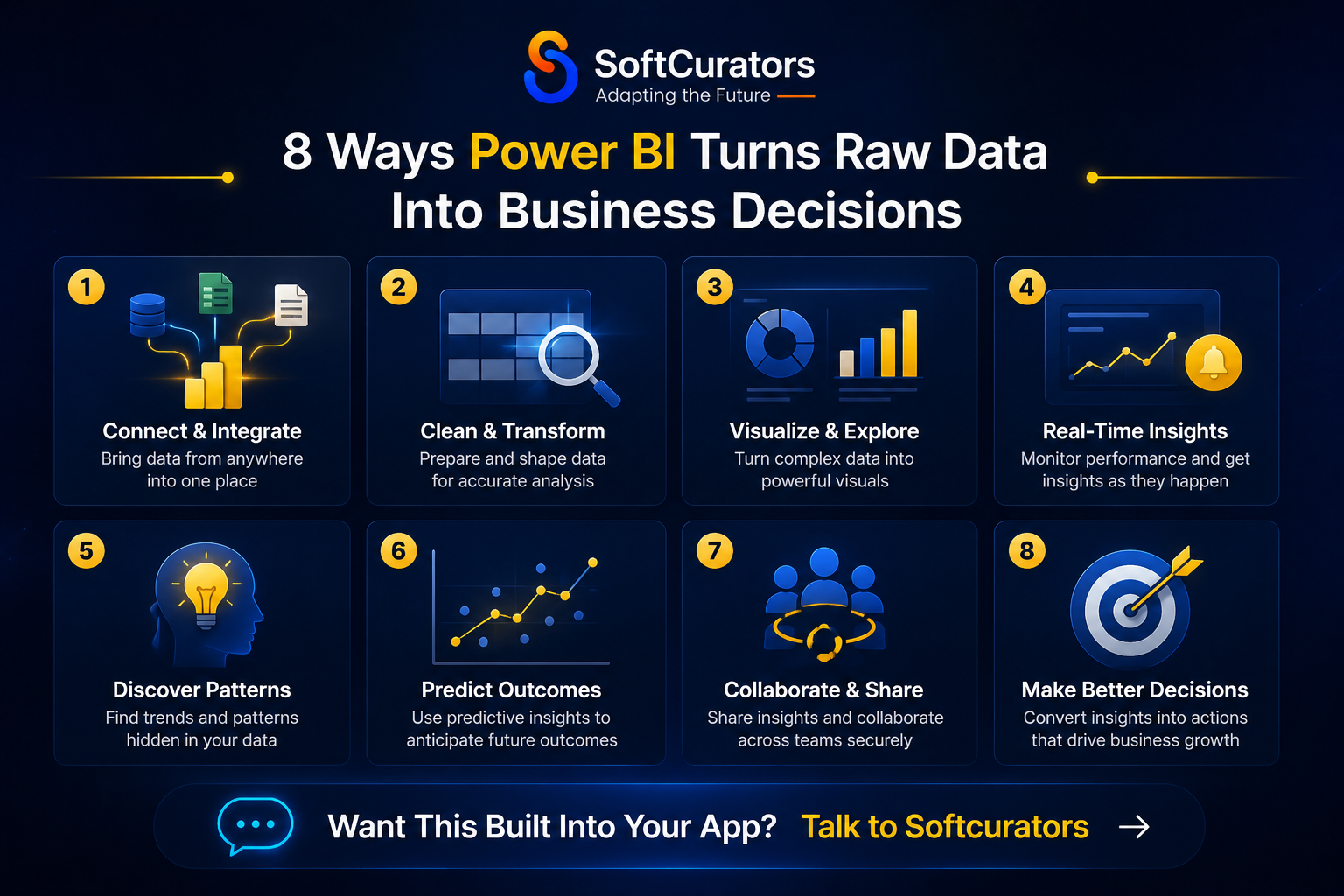
The 8 Ways Power BI Converts Raw Data Into Decisions That Move Businesses
This is the section that matters most to a business leader trying to understand whether Power BI is worth the investment. Here are the eight concrete mechanisms through which Power BI turns data that was previously inert into intelligence that changes behaviour.
1. It Connects Every Data Source You Have Into a Single View
The average enterprise uses over 130 SaaS applications. Each one holds a fragment of the business picture. Power BI’s connector library which includes over 100 native connectors plus REST API integration for any custom system pulls all of these fragments together into a unified data model.
Think of what that single view makes possible: a fintech company seeing customer acquisition cost alongside payment default rates and support ticket volume on one screen. A healthcare platform correlating patient appointment volume with billing cycle data and staff utilization. An ecommerce business viewing product return rates alongside the marketing channels that drove those customers in real time.
Softcurators builds these unified data models with careful attention to data governance ensuring that the unified view does not create confusion through inconsistent metric definitions, and that security permissions ensure each user sees only the data they are authorized to access.
2. It Makes Data Exploration Self-Service for Non-Technical Users
One of the most significant productivity gains Power BI delivers is the shift from analyst-gated data access to self-service analytics. With a well-built Power BI environment, a regional sales manager can slice the revenue data themselves by time period, product category, or customer segment without filing a request with the data team and waiting three days.
This is not about replacing analysts. It is about freeing analysts from repetitive report-building so they can focus on the work that actually requires analytical skill modelling, forecasting, root-cause investigation. And it is about giving business users the independence to ask and answer their own first-level questions without creating a bottleneck.
3. It Reveals Patterns That Humans Miss in Spreadsheets
The human brain is not built to find patterns in a table of 50,000 rows. It is extraordinarily good at finding patterns in visual representations of data. Power BI’s visualization engine scatter plots, heat maps, decomposition trees, clustering visuals transforms numerical tables into visual patterns that the brain processes intuitively.
A sales director looking at a heat map of regional performance by product category sees the Northeast/Premium Products underperformance instantly. The same insight buried in a spreadsheet requires someone to know to look for it, know how to calculate it, and have the time to do so. The visual version surfaces it passively, to anyone who glances at the dashboard.
4. It Delivers Alerts and Anomaly Detection Before Problems Escalate
Power BI’s data alert system allows users to set thresholds on any metric ‘notify me if website conversion rate drops below 3%’, or ‘alert me if today’s order volume is 20% below the 30-day average’ and receive push notifications on Teams, email, or Power BI Mobile when those thresholds are crossed.
For businesses running on-demand platforms, logistics operations, or banking and financial services, the difference between catching a problem at the one-hour mark versus the next-morning-report mark can translate directly into substantial financial impact.
5. It Embeds AI and Machine Learning Without a Data Science Team
Power BI’s AI features including Quick Insights, the Q&A natural language interface, anomaly detection, forecasting, and integration with Azure Machine Learning bring genuine predictive capability to business users without requiring a dedicated data science function.
The Q&A feature deserves special mention: users can type plain English questions into the search bar (‘What were last quarter’s top 10 products by margin?’) and Power BI generates the visualization automatically. This is not perfect it requires the data model to be properly labelled and structured but when it works well, it democratizes analytical access in a way that a traditional BI tool never could.
This native AI capability complements the deeper AI development and AI automation services that Softcurators provides for businesses that need ML models beyond what Power BI’s built-in features can deliver, our AI consulting services and AI app development teams can build and deploy custom models that feed their predictions back into Power BI dashboards.
6. It Surfaces the ‘Why’ Behind the Numbers Through Drill-Through and Decomposition
Power BI does something traditional reporting tools almost never did: it lets users drill through from a high-level metric to the underlying transactions that drove it. Revenue down 12% in Q3? Click the bar. See it broken down by product line. Click the underperforming product. See the individual orders. Click an order. See the customer, the region, the sales rep, and the timeline.
The decomposition tree visual takes this further it automatically breaks down a metric by its contributing factors and ranks them by impact. This turns a ‘revenue is down’ observation into ‘revenue is down because of a 34% drop in enterprise contracts, concentrated in two accounts, driven by delayed renewal decisions’ in three clicks.
7. It Integrates Directly Into Your Existing Applications
Power BI reports and dashboards can be embedded directly into any web application, mobile app, customer portal, or internal tool through the Power BI Embedded API. This is where Softcurators‘s integration work becomes especially valuable.
Instead of asking your operations team to log into a separate BI platform to check their metrics, we embed the relevant Power BI dashboards directly into the software they already use your custom web application, your iOS app, your Android app, or your internal portal. The analytics become part of the workflow, not a separate destination. That single design decision dramatically increases adoption and the actual business value extracted from the BI investment.
8. It Creates a Single Version of Truth Across the Entire Organization
When every department is working from the same Power BI dataset with consistent metric definitions, the same data refresh cadence, and the same approved calculation logic the Monday morning meeting stops being an argument about whose numbers are right and becomes an actual discussion about what to do next.
This ‘single version of truth’ benefit sounds obvious, but it is profoundly underestimated by organizations that have never had it. The amount of organizational energy that goes into reconciling inconsistent data across departments is enormous and Power BI, properly implemented, eliminates it entirely.
Power BI’s Core Components: What Each Piece Actually Does
Most introductions to Power BI describe the feature list. What businesses actually need to understand is what each component contributes to the end-to-end journey from raw data to business decision. Here is how Softcurators maps the component landscape:
Component |
What It Does |
Why It Matters Practically |
| Power Query / M Language | Connects to sources, cleans and reshapes raw data before it enters the model | This is where most BI projects succeed or fail. Bad data prep = unreliable reports. |
| Data Model (Tabular) | Defines relationships between tables, hierarchies, and calculation logic | The model is the brain of Power BI. A well-designed model makes every report fast and accurate. |
| DAX (Data Analysis Expressions) | A formula language for custom calculations, KPIs, and time intelligence | DAX enables the metrics that matter to your specific business not just what the data source provides. |
| Report Canvas | The drag-and-drop visual design layer | Where analysts and developers build the dashboards and reports end users interact with. |
| Power BI Service (Cloud) | Publishing, sharing, scheduling refreshes, and row-level security | This is the governance and deployment layer critical for enterprise-grade access control. |
| Power BI Embedded | API that embeds reports in any web or mobile application | Allows Power BI analytics inside your own products the layer Softcurators most commonly works with. |
| Power BI Mobile | Native iOS/Android apps for on-the-go dashboard access | Essential for executives, field teams, and any business where decisions happen away from a desk. |
| Power Automate Integration | Triggers automated workflows when data conditions are met | Closes the loop between insight and action alerts, approvals, and process triggers from BI data. |
| Azure Integration (ML, Cognitive Services) | Connects Power BI to custom ML models and AI APIs | Enables truly predictive BI churn models, demand forecasting, NLP-based categorization. |
Understanding this component map is important because many organizations buy Power BI licences, point them at a database, and wonder why the resulting dashboards don’t deliver the expected value. The gap is almost always in the modelling and data preparation layers the foundation work that Softcurators‘s engineering team does before a single visual is placed on a canvas.
Power BI Transforming Data Across Industries: Where Softcurators Has Seen It Work
Power BI is not a one-size-fits-all deployment. The most impactful implementations are the ones where the BI solution is designed around the specific decisions that a particular industry needs to make. Here is how Softcurators has seen Power BI drive tangible outcomes across the industries we serve:
Financial Services and Fintech
In financial services, the cost of a blind spot in data is uniquely high. A lending platform that cannot see its real-time default rate by loan cohort until the monthly report is running credit risk it cannot quantify. A BNPL provider that cannot correlate merchant category with payment default in real time is pricing risk incorrectly.
Power BI deployed in fintech contexts enables real-time portfolio health monitoring, cohort-level performance tracking, regulatory reporting automation, and AI-augmented credit scoring visibility. Our fintech app development practice integrates Power BI Embedded directly into the dashboards that credit officers, risk managers, and executives use daily making the insight part of the workflow rather than a separate destination.
Related reading: Our analysis of what fintech is and how it’s evolving explains why real-time data infrastructure is now a competitive baseline in financial services, not a differentiator.
Healthcare and Life Sciences
Healthcare organizations sitting on enormous volumes of patient data, billing records, clinical outcomes, and operational metrics often struggle to convert any of it into timely operational intelligence. Softcurators‘s healthcare app development practice deploys Power BI integrations that give hospital administrators real-time bed utilization visibility, connect patient flow data with staffing levels, and surface billing cycle bottlenecks before they become cash flow problems.
HIPAA-compliant Power BI deployments require careful architecture particularly around row-level security and data residency. This is a compliance area where Softcurators’ experience in mobile app security and compliance translates directly into the BI context.
Retail and Ecommerce
Ecommerce is perhaps the most data-rich environment of any industry and simultaneously one of the most common contexts where that data is completely unleveraged. Ecommerce platforms typically generate transactional data, product performance data, customer behaviour data, and marketing attribution data in real time yet most online retailers are making merchandising and marketing decisions based on weekly aggregated reports.
Power BI changes this fundamentally. A live dashboard connecting Shopify or WooCommerce transactional data with Google Ads spend, inventory levels, and customer lifetime value segments gives a merchandising team the ability to make pricing, promotion, and reorder decisions with same-day data. The competitive advantage of that speed compounds over time.
On-Demand Services and Logistics
For on-demand platforms and logistics operations, the data that matters is real-time and granular: driver availability, delivery completion rates, route efficiency, customer satisfaction by geography, and demand forecast accuracy. Power BI’s streaming dataset capability allows dashboards to update in real time from event-streaming sources giving operations managers a live picture of performance rather than a historical one.
Real Estate and Property Management
Property management companies and real estate platforms deal with complex, multi-dimensional data: occupancy rates by property, maintenance cost trends, lease renewal probability, market rate comparisons, and financial performance by portfolio segment. Power BI’s ability to visualize geographic data through map visuals makes it particularly well-suited to real estate analytics allowing portfolio managers to see performance patterns across geographies instantly.
Banking and Financial Infrastructure
For banking application contexts, Power BI’s value is concentrated in regulatory reporting, risk exposure visualization, and operational efficiency monitoring. A well-built Power BI environment can automate the data assembly for regulatory submissions dramatically reducing the analyst hours that typically go into preparing reports for Basel III compliance, AML transaction monitoring, and IFRS 9 expected credit loss calculations. Our investment platform development experience informs how we build these complex financial data models.
Power BI vs. The Alternatives: An Honest Comparison That Actually Helps You Decide
The business intelligence market has three dominant players: Power BI, Tableau, and Looker (now part of Google Cloud). There are also strong specialist tools Metabase for SQL-fluent teams, Sisense for embedded analytics, Qlik for associative data exploration. Here is how they compare honestly, without the vendor bias:
| Dimension | Power BI | Tableau | Looker (Google) | Metabase |
| Pricing | $10–$20/user/month (Pro) | $70–$115/user/month | $30+/user (GCP add-on) | Free (open source) / $500+/mo |
| Microsoft 365 Integration | Native, seamless | Limited (via connectors) | Requires configuration | Not applicable |
| Mobile Experience | Strong native apps | Good but not native-first | Web-responsive | Basic |
| AI/ML Built-In | Strong (Azure ML, Q&A, Copilot) | Moderate (Explain Data) | Strong (LookML AI) | Minimal |
| Learning Curve | Medium (DAX complexity) | Medium (Calculated fields) | Higher (LookML) | Low (SQL-based) |
| Embedded Analytics API | Power BI Embedded (strong) | Tableau Embedded (expensive) | Looker Embedded | Yes (open source) |
| Data Volume Performance | Good to 1B rows (Premium) | Excellent (Hyper engine) | Excellent (BigQuery) | Limited |
| On-Premises Option | Power BI Report Server | Tableau Server | No | Yes |
| Best For | Microsoft ecosystem, SME-enterprise | Data-heavy enterprise, scientists | Google Cloud stack | SQL-fluent teams, startups |
For the majority of Softcurators clients particularly those running on Microsoft Azure, Office 365, or SQL Server Power BI is the natural choice. The price-to-capability ratio is unmatched in the market, the integration with existing Microsoft infrastructure reduces implementation complexity significantly, and the embedded analytics API is mature and well-documented.
For clients with specific requirements that Power BI doesn’t serve well very large datasets requiring Tableau’s Hyper engine, or teams already deep in Google Cloud ecosystem we recommend accordingly. Part of our role as a trusted software development partner is giving honest technology recommendations, not defaulting to the most popular answer. That perspective is detailed in our guide on how to choose the right development company.
How Softcurators Integrates Power BI With Your Apps and Systems
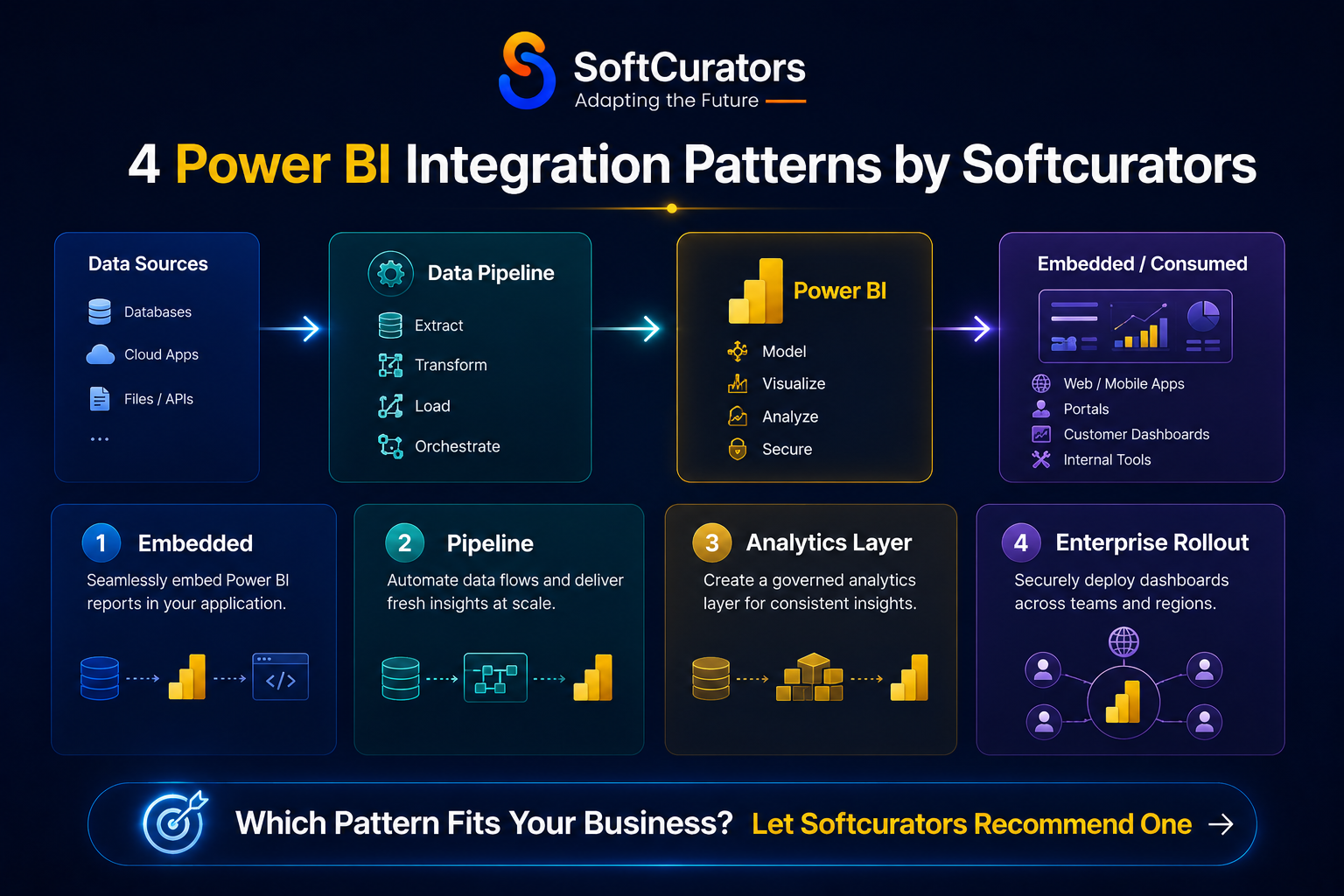
Power BI integration is not a single type of project. Softcurators approaches it differently depending on what you’re building and what your team already has. Here are the four integration patterns we execute most frequently:
Pattern 1: Power BI Embedded Inside a Custom Web or Mobile Application
The most powerful Power BI deployment for product companies is embedding dashboards directly inside your application. Using the Power BI Embedded API, Softcurators integrates interactive reports into your web application, iOS app, or Android app so your users access analytics inside the product rather than in a separate BI tool.
This approach is particularly valuable for B2B SaaS products where analytics is a core feature of the value proposition, and for enterprise internal tools where the BI layer should be part of the workflow not a separate destination that requires separate login credentials and separate habit formation. Our cross-platform app development and progressive web app capabilities mean the embedded analytics work beautifully across every device and screen size.
Pattern 2: Building the Data Pipeline That Feeds Power BI
Power BI is only as good as the data flowing into it. For clients with complex data landscapes multiple source systems, real-time requirements, large data volumes, or significant data quality issues Softcurators builds the full data pipeline: extraction from source systems (custom APIs, database connections, webhook integrations), transformation in Azure Data Factory or Python-based ETL, storage in Azure Synapse or SQL Server, and connection to Power BI’s semantic layer.
This full-stack approach means the dashboards Softcurators delivers are built on a trustworthy data foundation not just pointed at a raw operational database and hoping for the best. It reflects the same engineering discipline we apply to fintech app development, banking platforms, and healthcare applications where data integrity is non-negotiable.
Pattern 3: Power BI as the Analytics Layer for an Existing Application
For clients who already have a running application and want to add analytics capability, Softcurators builds the bridge between your existing application database and a Power BI reporting layer without disrupting the production system. This often involves building a read replica or reporting database that receives a continuous feed of application data, on which Power BI runs its queries without impacting application performance.
This pattern is common for on-demand platforms, food delivery apps, and taxi/ride booking applications where operational data is extremely valuable for management decisions but adding reporting queries to the production database would impact performance for end users.
Pattern 4: Enterprise-Wide Power BI Governance and Rollout
For larger organizations deploying Power BI across multiple departments and business units, Softcurators builds the governance framework: workspace architecture, naming conventions, certification workflows for approved datasets, row-level security implementation, and a Centre of Excellence model that empowers internal teams to build their own reports within guardrails.
This pattern requires a combination of technical architecture and organizational change management a combination that Softcurators handles through a structured deployment programme that includes stakeholder training, documentation, and a 90-day post-deployment support period.
Building a Power BI Solution with Softcurators: Cost, Timeline & What to Expect
One of the most common questions we hear from prospects is ‘how much does a Power BI integration actually cost?’ The honest answer, as with most complex technical projects, is that it depends but here is a framework that makes the range meaningful:
| Project Type | Scope | Timeline | Estimated Cost (USD) |
| Starter BI Dashboard | 3–5 reports, single data source, Power BI Pro | 2–3 weeks | $2,000–$5,000 |
| Multi-Source Analytics Layer | Data pipeline + 5–10 reports, 2–4 sources, scheduled refresh | 4–8 weeks | $6,000–$15,000 |
| Power BI Embedded in Web App | Embedded API integration, token auth, custom theming, responsive layout | 4–8 weeks | $5,000–$16,000 |
| Power BI Embedded in Mobile App | iOS + Android embedding, push alerts, offline support | 6–10 weeks | $18,000–$45,000 |
| Full Data Warehouse + BI | Azure Synapse/SQL DW build + Power BI layer + governance | 12–20 weeks | $20,000–$60,000 |
| Enterprise-Wide Governance Rollout | Multi-workspace, RLS, Centre of Excellence, training | 16–24 weeks | $30,000–$70,000 |
| AI-Augmented BI (ML + Power BI) | Custom ML models in Azure ML feeding Power BI dashboards | 10–18 weeks | $15,000–$50,000 |
These ranges reflect Softcurators‘ actual engagement history. The spread within each range reflects variation in data complexity, number of source systems, security requirements, and the level of bespoke DAX modelling required. Our free consultation produces a detailed, itemized estimate within 3 business days not a vague range, but a scoped proposal with defined deliverables.
For broader context on how data and analytics features affect overall app development costs, our mobile app development cost guide and the discussion of technology choices in mobile app development are useful background reading.
The Power BI Mistakes That Kill ROI And How Softcurators Avoids Every One of Them
We have reviewed enough Power BI deployments that went wrong to have a clear picture of the patterns. These are the eight mistakes that most commonly result in a significant BI investment that delivers disappointing value:
- Skipping the data model entirely: Pointing Power BI directly at a transactional database and building reports on raw tables might produce dashboards but they will be slow, hard to maintain, and prone to calculation errors. A properly designed semantic layer (star schema, defined relationships, DAX measures) is the foundation that every well-performing BI deployment is built on. Softcurators always builds the model first.
- Inconsistent metric definitions across reports: When ‘active user’ means something different in the marketing dashboard than it does in the product dashboard because different analysts defined it differently in different reports the single version of truth Power BI is supposed to deliver never materializes. Softcurators enforces centralized measure definitions in a shared certified dataset that all reports draw from.
- No row-level security: In organizations where different users should see different data subsets (sales reps see only their region, managers see their team, executives see everything), neglecting row-level security means either over-sharing sensitive data or under-deploying the BI tool because you can’t share dashboards safely. This is a Day 1 architecture decision, not a post-launch patch.
- Designing for IT, not for the user: Power BI dashboards built by database engineers often show everything that is technically available not what the business user needs to make their specific decision. Softcurators’ UI/UX design practice leads dashboard design from the user’s decision-making workflow backward, not from the data model forward. Our UI/UX best practices apply directly to BI design.
- Over-relying on DirectQuery without understanding the tradeoffs: DirectQuery (querying the source database live) vs. Import mode (loading data into Power BI’s compressed model) is one of the most consequential technical decisions in a Power BI deployment. DirectQuery gives real-time data but can create serious performance problems on unprepared databases. Softcurators evaluates this decision explicitly for every data source in the model.
- No refresh monitoring or failure alerting: A dashboard that users trust is one that always shows current data. If your scheduled data refreshes are failing silently and users are making decisions on stale data without knowing it the BI investment is actively creating risk rather than reducing it. Softcurators implements refresh monitoring and failure alerting as a standard component of every production deployment.
- Building too much too fast: Organizations that attempt to build 50 reports covering every corner of the business in a single BI project almost always produce a bloated, poorly adopted deployment. Softcurators uses an MVP-first approach our MVP development methodology applies to BI just as it does to application development. Start with the 3–5 decisions that most need data support. Build, validate, adopt, expand.
- Ignoring adoption: The best Power BI deployment in the world creates zero business value if people don’t use it. Training, communication, and change management are as important as technical implementation. Softcurators includes user training and adoption support in every Power BI engagement because the goal is not a delivered dashboard, it is a decision-making culture that uses data.
Why Enterprises Choose Softcurators as Their Power BI Integration Partner
There is no shortage of consultants and agencies who will build you a Power BI dashboard. The question is what you get after the dashboard is delivered and whether the team that built it understood your business well enough to build something that actually changes how decisions get made.
Softcurators’s advantage in Power BI work comes from something most pure BI consultancies cannot offer: we are first and foremost an application development company. We build the apps that the data comes from. Architect the backends that store it. We design the mobile experiences that need to display it. That end-to-end perspective means our Power BI solutions are engineered from the data source to the user decision not just the middle layer.
- Full-stack data-to-app capability: From database design to AI model integration to mobile app embedding Softcurators handles the complete technical chain, not just the Power BI layer.
- Domain expertise across industries: Our work in fintech, healthcare, ecommerce, banking, and on-demand services means we bring industry-specific metric frameworks and data governance knowledge to every engagement.
- AI-augmented BI capability: Our AI development, AI consulting, and AI automation practices mean we can build and deploy machine learning models that go beyond Power BI’s native AI features integrating predictions, anomaly detection, and NLP capabilities that make the BI layer genuinely intelligent.
- User-centred design thinking: Our UI/UX design team ensures that every dashboard we build is designed for the human who will use it, not the database that feeds it. Adoption is the metric that matters most, and good UX design is the primary driver of adoption.
- Post-deployment support: Dashboards need maintenance as the business evolves and the data structures change. Our maintenance and support service ensures your Power BI environment stays accurate, performant, and aligned with your current business questions not the questions you had when you first deployed.
- Transparent, outcome-focused engagements: Read more about why businesses choose Softcurators and explore our portfolio of delivered projects to see the breadth of complex technical work we’ve delivered.
Raw Data Is Not an Asset Acted-On Insight Is
Data sitting in databases is just storage cost. Data that flows into a well-engineered Power BI environment, gets modelled with precision, and gets delivered to the right people in the right format at the right time that is a competitive asset. That is what changes how a company prices, staffs, markets, invests, and grows.
The businesses that will dominate their categories in the next five years are not necessarily the ones with the most data. They are the ones that have built the shortest path between their data and their decisions. Power BI, implemented correctly, is the fastest way to build that path.
Softcurators brings the full technical capability to make that implementation correct: the data engineering, the modelling expertise, the AI integration capability, the mobile and web application development depth to embed analytics where people actually work, and the UI/UX design craft to make dashboards that people actually use.
The first 30 minutes costs you nothing. Book a free consultation with Softcurators and let’s look at your specific data challenge together.
FAQs
How does Power BI transform raw data into actionable insights?
Power BI transforms raw data through a four-stage process: first, Power Query connects to source systems and cleans inconsistent or incomplete data; second, the data model defines the relationships between datasets and the business logic of calculated metrics; third, visualizations represent the processed data in patterns the human brain reads intuitively; and fourth, alerts and AI features surface insights proactively so users do not need to actively search for problems. Softcurators engineers each of these stages with care — because the quality of the insight depends entirely on the quality of the engineering underneath it.
What data sources can Power BI connect to?
Power BI has over 100 native connectors covering databases (SQL Server, PostgreSQL, MySQL, Oracle, MongoDB), cloud services (Azure, AWS, Google BigQuery), SaaS applications (Salesforce, HubSpot, Google Analytics, Dynamics 365, SAP), files (Excel, CSV, JSON, XML), and streaming data sources. For custom systems without a native connector, Softcurators builds REST API connections or custom data pipelines that feed Power BI with data from any source.
How long does it take Softcurators to build and deploy a Power BI solution?
A starter dashboard with one or two data sources and three to five reports takes two to three weeks. A multi-source analytics layer with a data pipeline takes four to eight weeks. Full enterprise deployments with data warehousing, governance, and enterprise-wide rollout take three to six months. Softcurators' approach is to deliver usable value quickly — starting with a focused MVP dashboard set — rather than building for months before anything reaches users.
How much does a Power BI integration with Softcurators cost?
Costs range from $4,000 to $5,000 for a focused starter dashboard, $5,000 to $25,000 for Power BI embedded in a web or mobile application, and $20,000 to $60,000 for full data warehouse and enterprise governance deployments. Softcurators provides itemized, fixed-scope estimates within three business days of a free consultation not vague ranges, but a specific proposal with defined deliverables and timelines.
Can Power BI be embedded directly inside our app or web platform?
Yes. Power BI Embedded is a mature API that allows Power BI reports and dashboards to be rendered inside any web application or mobile app with full interactivity. Softcurators handles the full embedding implementation — authentication, token management, custom theming to match your app's design system, and responsive layout for mobile screens. The result is analytics that feel like a native part of your product rather than an external BI tool.
Does Power BI work on mobile phones and tablets?
Power BI has native iOS and Android mobile apps that render dashboards with touch-optimized interactions. When Softcurators builds Power BI solutions, we design reports with the mobile experience in mind from the start — not as an afterthought. Reports can be formatted specifically for phone-portrait layout, and push alerts can be delivered to the Power BI mobile app when KPI thresholds are breached.
How does Softcurators handle data security and access control in Power BI?
Softcurators implements row-level security (RLS) in the Power BI data model to ensure each user sees only the data they are authorized to see. We configure workspace security in Power BI Service to control who can view, build, or administer different report environments. For enterprises with sensitive data in regulated industries (financial services, healthcare), we architect the data pipeline with encryption in transit and at rest, and ensure compliance with relevant regulations including GDPR, HIPAA, and PCI-DSS as applicable.
What is the difference between Power BI Pro, Premium, and Embedded?
Power BI Pro ($10–$20/user/month) is the standard user licence for publishing, sharing, and collaborating on reports. Power BI Premium is a capacity-based model (starting around $5,000/month) that allows unlimited viewer licences within the organization and supports larger data volumes and advanced AI features. Power BI Embedded is a developer SKU for building Power BI capabilities into custom applications where you own the application and embed Power BI reports for your end users. Softcurators helps clients choose the right licensing model for their deployment scenario.
What is DAX and do we need to learn it?
DAX (Data Analysis Expressions) is the formula language used to define calculated measures and columns in the Power BI data model. It is essential for any non-trivial Power BI deployment — complex KPIs, time intelligence calculations (year-over-year growth, rolling averages), and conditional logic all require DAX. Your business users do not need to learn DAX — that is what Softcurators handles. Your internal team may want to learn the basics over time, and Softcurators includes training as part of our deployment engagements.
How often does Power BI refresh data — is it truly real-time?
Power BI offers several refresh modes. Import mode with scheduled refresh can update data as frequently as every 30 minutes on Power BI Pro. DirectQuery mode queries the source database live with each report interaction, delivering near-real-time data. Streaming datasets update in real time from event sources using the Power BI REST API. Softcurators selects the right refresh architecture for each data source based on how current the data needs to be and the performance implications of each approach.
Can Power BI use artificial intelligence to predict future trends?
Yes. Power BI has built-in forecasting visuals that apply exponential smoothing to time-series data. More powerfully, Power BI integrates with Azure Machine Learning, allowing custom ML models (churn prediction, demand forecasting, anomaly detection) to run on your data and surface their predictions in Power BI dashboards. Softcurators' AI development and AI consulting teams build these custom models as part of integrated BI engagements — going beyond what Power BI's native AI features can deliver.
What is Power BI Embedded and how is it different from the regular Power BI Service?
Power BI Service is the cloud platform where Power BI users publish and access reports using their own Microsoft accounts. Power BI Embedded is an API that allows developers to embed Power BI reports inside any custom application — your web app, mobile app, or customer portal — where end users access the analytics without needing a Power BI account. Embedded is the pattern Softcurators uses when clients want analytics as a native part of their product, rather than a separate BI destination.
How does Power BI handle very large datasets?
For large data volumes, Softcurators recommends Power BI Premium with incremental refresh policies, or a connection to an Azure Synapse Analytics warehouse that handles the heavy aggregation before Power BI retrieves the results. Composite model architecture (combining Import and DirectQuery in a single report) also allows large fact tables to be queried live while smaller dimension tables are imported for performance. Power BI Premium's Large Model support can handle datasets up to 400GB in memory.
Can we use Power BI to automate reporting that we currently do manually in Excel?
This is one of the most common and highest-ROI applications of Power BI. Reports that currently take an analyst hours to assemble in Excel — pulling data from multiple sources, running calculations, formatting, and distributing — can be replaced by a Power BI dashboard that assembles itself on a defined refresh schedule and is accessible to any authorized user at any time. Softcurators specializes in mapping existing Excel-based reporting workflows and rebuilding them as automated, self-service Power BI environments.
How do we get Power BI reports to our executive team on their phones?
The Power BI mobile app (iOS and Android) delivers dashboards optimized for phone screens, with the ability to set favourites, receive push notifications for KPI alerts, and interact with reports using touch gestures. Softcurators designs phone-layout versions of executive dashboards specifically for mobile consumption — a curated, high-signal view with the three to five metrics an executive needs to check daily — separate from the more detailed desktop versions built for analysts.
What is the Q&A feature in Power BI and how useful is it really?
Q&A allows users to type natural language questions ('Show me revenue by region for Q3 2024') and Power BI generates a visualization automatically. In well-built, well-labelled data models, Q&A is genuinely useful for ad hoc exploration. In poorly designed models with cryptic field names, it fails frequently. Softcurators builds data models with Q&A optimization in mind — using synonyms, user-friendly field naming, and featured questions — so the feature delivers real value rather than frustrating users.
Is Power BI suitable for startups or is it only for large enterprises?
Power BI Pro at $10/user/month is accessible for teams of any size. Startups that build the analytics habit early — using data to make product and growth decisions from the beginning — have a structural advantage as they scale. Softcurators' startup app development practice and MVP development service include Power BI integration options for early-stage companies that want analytics built into their product from day one, not retrofitted later.
What is the difference between Power BI and Excel for data analysis?
Excel is a calculation tool optimized for individual analysis of manageable data volumes. Power BI is a business intelligence platform optimized for organizational analytics at scale — connecting to live data sources, supporting thousands of concurrent users, enforcing consistent metric definitions, and delivering interactive visualizations. The right answer for most enterprises is both: Excel for ad hoc analysis by individual analysts, Power BI for the shared analytical surface that the whole organization navigates from.
How does Power BI compare to Google Looker Studio for a business using Google Workspace?
Looker Studio (formerly Data Studio) is free, integrates natively with Google Analytics and Google Ads, and is excellent for marketing analytics in Google-centric stacks. Power BI has a significantly richer data modelling layer (DAX vs. Looker Studio's calculated fields), better performance on complex models, a stronger mobile experience, and more sophisticated AI features. For businesses primarily on Google Workspace with simple reporting needs, Looker Studio may be sufficient. For businesses needing enterprise-grade BI with complex modelling, Power BI is substantially more capable.
How do we know if our data infrastructure is ready for Power BI?
The honest answer is that most businesses are not fully ready — and that is exactly why Softcurators' Power BI engagements always begin with a data infrastructure assessment. We evaluate your source systems, data quality, data volumes, existing ETL processes, and organizational data literacy. Based on that assessment, we recommend the right deployment architecture — and if data infrastructure work is needed before Power BI can deliver meaningful value, we scope that as part of the engagement rather than overselling the BI layer.
Can Power BI replace our current data warehouse?
Power BI can serve as both a reporting layer on top of an existing data warehouse and, for smaller data volumes, as its own in-memory analytical layer through the Power BI data model. For enterprise deployments with large data volumes or complex data transformation requirements, Softcurators recommends building a proper data warehouse (Azure Synapse, Azure SQL, or another cloud DW) and connecting Power BI to it — getting the best of both: a scalable analytical store and a rich visualization and BI layer on top.
What ongoing maintenance does a Power BI deployment require?
Power BI deployments require ongoing maintenance as source systems change schema, business metrics evolve, new data sources need to be connected, and user feedback drives dashboard improvements. Softcurators' maintenance and support service covers scheduled model updates, refresh monitoring, security patches, new report development, and performance optimization. We treat Power BI environments as living products, not delivered assets — because the business context that shapes what the dashboards need to show is always evolving.
What is Power BI Copilot and should we be considering it?
Power BI Copilot is Microsoft's AI assistant integrated into Power BI that can generate reports from natural language descriptions, explain the insights in a visual, summarize page content, and help build DAX measures. As of 2026 it requires Power BI Premium or Premium Per User licensing. For enterprises already on Premium, it is worth evaluating — particularly for accelerating report creation and making analytical access more intuitive for non-technical users. Softcurators evaluates Copilot suitability as part of licensing and architecture recommendations for each client.
How do I get started with Power BI through Softcurators?
The first step is a free 30-minute consultation at softcurators.com/contact. We will discuss your current data landscape, your most pressing analytical gaps, the applications and systems you need to connect, and your target user base. From that conversation, Softcurators produces a detailed project proposal with defined scope, deliverables, timeline, and cost — within three business days. No obligation. No generic templated response. A real architect who has built this before, thinking about your specific situation.
